Unknown's avatar

About ContentRambler

Part time blogger, employee, mum, enjoying rambles around the country of content, social networks, and blogging. Marketing tourist.

The content priority matrix – focus your blogging efforts

In my previous post I applied the Eisenhower priority matrix to companies/investors’ priorities. In this post I try to answer the question: how does the money issue affect the nature of (corporate) blogging? I also give away 6 tips for single-topic blogging and my thoughts about part-time business blogging.

The two sides of the content priority matrix for blogging

What is the main issue with blogging to make money in whatever way?

Content Priority Matrix for Blogging

Content priority matrix for professional bloggers

It could be this: the point of anything you do to influence other people is that there are two sides to the window (or priority matrix) you’re looking through.

Where there are bloggers looking out, you’ll find readers looking in. At least, I sure hope so.

Content priority matrix: focus for professional blogging

Professional bloggers, from their side of the ‘window’, would be interested in these aspects of potential blog topics:

  • Money generating topic – adjacent but non-commercial topics
  • Expertise – no expertise

As a full-time professional blogger you would invest most of your time on topics that let you share your expertise and that could yield money by addressing people’s urgent and important needs. If there were a related topic that could make considerably more money you’d spend some of your time extending your expertise in that direction. The other bits you’d leave out or use to add interest to your otherwise fact-ridden business blog.

The ‘expert-no money’ quadrant is also amply filled by personal blogs. ‘No money’ may in fact not be an accurate description, because showing yourself to be an expert at anything, including being consistently funny, may still end up in some kind of business or career opportunity!

What matters to business blog readers?

What writing is there on the window sill on the outside – the side of the readers of a business blog? You might learn more by taking a peek at the matrix I made for this post, in which I try to visualize the way we (sensible consumers that we are) prioritize our purchases 😉

  1. Relevant – not relevant (‘important’)
  2. Urgent – not urgent

If a blog post deals with a relevant topic, you’ll read it – note that this involves a decision to invest your time! Now, if I try to coax you towards signing up for more, I’ll have the greatest success if I’m not only spot on topic-wise, but if you’re also convinced that:

  • you need to know more
  • you need to buy this service or product urgently

You’ll find plenty of blogs out there that tell you how you should tackle the issues of being utterly relevant, building trust, and connecting. Crafting a sense of urgency is an absolute knack of some sales folk. You know, the ones who catch you viewing stuff like door locks and come up with a special offer only for today to “help you keep your precious family safe” from the big bad world outside if you’ll go for the Complete Burglar Alarm Set For Pros. Them.

If you don’t want to be pushy, remember not everyone responds well to the “buy now or miss out on a life-changing experience” approach. You can opt to be more subtle.

6 tips for single-topic blogging

“Stick to one topic and forget the rest” is the advice professional bloggers/content marketers give to others who want to make money blogging. To make a single-topic blog work, you need to:

  1. check every month which of your posts got top numbers in readers, subscriptions, and conversions.
  2. skip the rest and focus on the stuff that works
  3. keep experimenting by introducing the odd off-topic post and check the results
  4. plan ahead so you don’t run out of content juice
  5. haul in guest bloggers to take the strain off your blogging or to increase the frequency with which you post
  6. keep an eye on similar blogs for more ideas.

Part-time blogging

As a part time (business) blogger you might find yourself running into a serious writers’ block if you tried to stick to just one topic and write about it several times per week. The alternative is to blog once or twice a month. That’s often enough for blogs that are part of a business website. You’ll keep fresh and relevant content coming without it costing too much time and effort.

The main thing is that you think about your blog and make decisions. It’s fine if you change your mind later – just remember to make another informed decision rather than drifting into a blogging routine you never intended to develop. Especially in corporate blogging, focus is key.

If you run into unexpected topics on this blog, I hope you find them a pleasant surprise. Add your thoughts about content, priority, money – please share this post – I hope I’ve given you food for thought 😉

Money and the infinite pursuit of innovation

Having a couple of million dollars in your bank account takes the urgency out of your drive to innovate… Just last Tuesday I ran into this piece of Stanford research. It shows that an initial public offering (IPO) on the stock market has a negative impact on the level of innovation in a company. I get that. Being rich might even make a lot of bloggers lazy 😉

But.
I wonder where true inventors go after they leave such a company. Do they spend the rest of their lives hanging out by the pool side? Somehow I don’t think so. So why do they leave? An IPO – or the presence of money – seems to cause a shift in a company’s priorities away from creativity. In this post I will explore the issue (without suggesting I did any kind of thorough research myself).

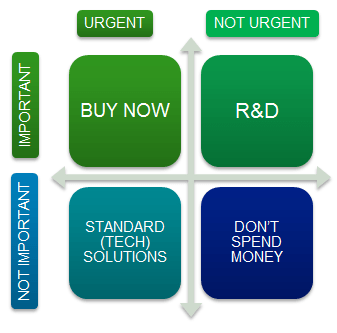
Money Creativity Matrix

IPOs seem to cause a shift to urgency (left) at the expense of R&D activities

Why do innovators leave after an IPO?

At one point in my career I was working at a, well not a start-up because it was a couple of years old, but still a company in the early pioneering stage. Characteristics:

  • Most people around are actively trying to improve the product, or they’re helping out on the stuff that needs to get done.
  • No one gets excited over quarterly reports, but they do get wowed by anything that will make the product easier or more fun to use because everyone wants people to know it and love it and, yes, buy it too.
  • The bottom line is that there is no budget but you’re allowed to tinker. If you have an idea, you check with your boss (the owner/entrepreneur) and he may well give you permission to invest your time, energy, and intelligence. So long as the dull must-do tasks are taken care of too.

Creativity scare #1: investors’ risk adversity

The moment IPO and suchlike is around the corner this all changes. Inventors become the engineering department. That may sound like an important part of the company, but more and more people within the company get interested in things like marketing and quality control and business process management. Which basically means more rules. It means that if you are really excited about something you thought up, you need to make sure you’re talking to the right person by the coffee machine or risk:

  • watching their eyes glaze over as they say “Oh – yeah. That’s great, really great”.
  • having them say stuff like “I’m not sure that’s allowed/safe actually”.

That’s exactly the kind of situation that might, apart from no longer having to worry about money, cause this:

“I find that the quality of innovation produced by inventors who remained at the firm declines following the IPO and key inventors are more likely to leave.” (Shai Bernstein)

Key inventors – that doesn’t sound like people who were in it just for the money. These are the born tinkerers.

Innovations that do pass the risk-and-legal test may have been compromised at an early stage – any part deemed risky is replaced by add-ons to bits that were invented at an earlier stage. It seems that investors want you to do what you’ve proved yourself to be good at, only more of it, and without risky adventures now that their money is involved. Think sequels 🙂

Creativity scare #2: a sense of urgency

Marketing talk on its own is unlikely to scare innovators away – start-ups all try to come up with a viable product. What else is there? An innovator is motivated by curiosity – wanting to find out how things work, how problems can be solved, products might be improved…

A shift in your company’s mindset from opportunities to threats (to the investors’ money, for example) will lead to decisions based on a sense of urgency. Especially if you have the money to act immediately – you find yourself buying a company that has the necessary tech rather than wasting time trying to figure it out yourself. Added effect is that such an action knocks out a potential competitor, or allows you to effectively monopolize a couple of relevant patents.
Invest wisely – don’t gamble.

How to pull off the combination of money AND the pursuit of creativity

There are at least two things you can do to safeguard creative processes in your company:

  1. I found this sentence: “Firms with more entrenched managers, whose greater job security makes them less likely to be sensitive to market pressures, experience a smaller decline in innovation novelty, and interestingly, their inventors are less likely to leave the firm.” I could translate this as “Firms that don’t get completely taken over by shareholders don’t scare their inventors away as much.” Make sure your company has solid management before even considering going to the stock exchange.
  2. Don’t interfere with creative processes by throwing risk and legal stuff in at an early stage. Let innovators tinker and give them credit for being good at it. This is what companies like Google understand. Inventors, while liking the idea of having enough money to live a comfortable life, need to know they are allowed to tinker (part of their time). There’s nothing quite like someone asking themselves “I wonder if it’s possible to… How about if I try…” and taking off. This is ‘flow’ for inventors. Mess with that and you should not be surprised if your inventors pack up and leave.

If you don’t like the sound of ‘letting them tinker’, you need to accept that your top innovators will turn elsewhere to do what they do best.

Source: Research paper No. 2126 “Does Going Public Affect Innovation?” Shai Bernstein, Graduate School of Business, Stanford University, December 2012.

P.S.: I just found myself wondering how this relates to blogging vs. corporate blogging. What do you think?

I hope you found this post of interest! Please add your thoughts about innovation, creativity, and tinkering in general in a comment – what else could you do to keep inventors on board?

Blogging impressions: 5 tips from my content creation ‘desk’

Sometimes the only way to get going is to sit down and start writing. At the beginning of this month I felt there were things I needed to share with you about LinkedIn even though I know it’s not for everyone. This time I want to share some tips from my first 6 months of blogging.Content Creation

I started this blog in order to find out if I could write, and write on a regular basis without simply running out of ideas really fast. Most of the time I have some idea of the subject before I sit down and write more than just a few lines – but sometimes I start my content creation process from scratch. All in all I guess I have the content as well as the rambler bit covered 🙂

Well-known important blogging tip: keep some ideas and drafts handy

It’s really helpful to have a couple of ideas for posts. But just now I reviewed my drafts and found they looked rather stale. Mark Schaefer reported something similar happening to him a while ago when he forgot his routine: whenever you have an idea, jot it down somewhere.

I’ve been meaning to write another “blogging impressions” post for a while, because it is about half a year since I published my first post.

My blogging tip: prepare for change so it doesn’t mess up your blogging routine

One major development which may impact my blogging frequency is the fact that I’m now back to my 32-hour work week (4 days). On my day off I tend to do way too much to entertain my son and myself. And my son is no longer taking naps in the afternoon. This means I have less time to let ideas for new posts form and to jot them down for later use. I have yet to find a routine that fits my new schedule. I may need to go back to posting once a week for a while. But we’ll see what happens 😉

How have 6 months of blogging on Content Rambler affected me?

Well, I’ve felt a lot better about my work and related activities. Because blogging helps me share all the things I read and learn along the way. I enjoy sharing my knowledge far too much to let it depend on occasions like presenting a topic to my team. Based on my early blogging experiences, my answer to the question:

Why should you blog?

Would be that your reasons to blog may include:

  1. Improving your writing skills
  2. Being creative
  3. Seeing tangible results of your efforts, starting with the existence of another published post (possibly followed, at some point, by a like or a comment online or IRL)
  4. Feeling better about yourself thanks to 1-3.
  5. Testing your ability to keep it up (discipline or passion?)
  6. Not depending on others to contribute something sensible (or funny) about subjects that matter to you
  7. Sharing your knowledge

Some of these reasons are purely personal. Others could be relevant for business purposes. Some listed benefits touch upon definite drawbacks.

Blogging tips 3-5: how to deal with the drawbacks

Just start writing Sometimes you think you have no idea what to write about. You need to just get started, writing about anything, and when you review your text you’ll probably find the start of a new post in there. It’s how I started this post, and I’ve left the first bit in to show you how it works. At some point I realized I had tips based on my blogging experiences that I wanted to share.

Blog when you think no one cares – a blogging tip from Jeff Bullas this time I think. I read too much. No response to your post is something you need to get used to. Some bloggers get around this by bringing all their Facebook friends onto their blogs. If you don’t have that option, look up other blogs via your WordPress reader and spend some time liking and commenting on interesting or funny posts. After all, your fellow bloggers are putting in their time and effort just like you! Show your appreciation for a good post and let ’em know you exist. Maybe they’ll visit your blog as a result, and maybe they won’t. It’s called free will, and you need to deal with it.

Trigger actions This ‘blogging’ thing takes time. The writing, editing, getting images, looking things up to avoid talking complete rubbish… unless you limit yourself to writing only about topics you’re completely knowledgeable about and you skip editing. Or you don’t write (much) but post photographs instead. To help the ‘discipline’ bit: instead of saying you’ll sit down to blog at 8.30 PM, build in actions that trigger your blogging routine. In my case, as soon as my son is in bed, I go downstairs and sit down to blog. Once I’m blogging, there are times when I’m oblivious to whatever crap is on television but first I need to get started. My routine is “go downstairs and blog”. Easy. No thinking, no decisions required.

Finally, not really a tip because I haven’t looked at possible answers yet: knowledge sharing (#7) Sharing your knowledge may sound great but if you want to know how many people are actually reading your (business) content, you should know WordPress statistics don’t register every view (see their support pages). You notice something’s not right the moment you get more likes than registered views. If you have any suggestions apart from going self-hosted, please let me know.

That’s it – five ways from my content creation desk to help you “Just do it” instead of running into the brick wall called writer’s block. If you’d like to add your thoughts about blogging, my comments section is always open 😉

The usual suspects: why we don’t buy as readily as we sell

After my recent ramblings about LinkedIn I thought I might return to another topic of interest: marketing and blogging. There is a lot to be said for taking a marketing approach what you do on your blog. Especially if you’re wondering why some things you do just fall flat for no apparent reason.

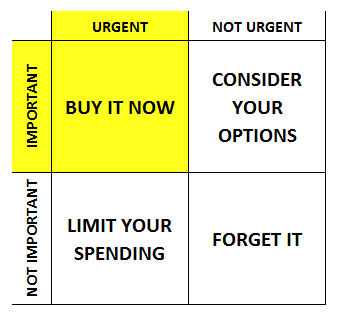
Buyers Prioritization

You got yourself an audience, a good call to action to get your readers to join your subscribers list, you’re sending them information about your products/services… and then, well, nothing. Well, not nothing – but… You’re an expert. Surely everyone is going to want to buy the valuable stuff you have to offer? Why aren’t the %% higher than this?

In this post I’ll take a roundabout tour through marketing and then get back to your blog.

Marketing and the usual suspects

Purely from a marketing/sales view it’s a matter of buyer’s journey or even ‘buyer cycle’, which has phases to mark where on the road towards your first or next purchase you might be.

  1. If you’re in the right group of people (say busy working mum who loves high-heeled boots but won’t risk twisting an ankle again running after child no. 2) you’re a suspect. In fact we’re all someone’s suspect. We all buy something at some point.
  2. The moment you subscribe to anything, you turn into a prospect: someone who shows a definite interest in the kind of services/products a company offers. In some cases it means you get spammed daily – companies seem to think they need to haul you in NOW or you might end up buying a competitor’s product.
  3. Once you’re in their webshop…
  4. … loading stuff into your shopping cart (or taking similar actions) there’s an almost audible drum roll.

In many cases people never get beyond stage two. Why not? There are plenty of tips out there that focus on mending the leaks in your sales funnel, but I’m not going to discuss incontinent marketing processes here.

Theorize about your potential buyers’ priorities

Think about yourself as a reader of blogs (and a potential customer for someone) for a moment. Since I don’t know you, I’ll make up for this bit by talking about myself and pretending I’m a version of you. In this multiverse there must be a universe where I’m you 😉

You read and view loads of stuff every day, either for personal or professional purposes. Depending on your job and other interests, some topics matter a lot, others a little. There’s one topic that you’re mainly interested in because it affects your job. You don’t need to know everything, but you do need to keep up to date. So you read up online. After all what’s the internet for? Then you attend an webinar. From the moment you subscribe you get spammed by at least half a dozen companies trying to sell you stuff that’s related to the subject of the webinar. Preferably expensive and IT-related. Oh, great…

Enter the wonderful world of the ‘buyer persona’

Using a buyer persona (or several) means you basically assemble some characteristics into a credible theoretical buyer. Age, lifestyle, and depending on what you’re trying to sell you throw in a job title, professional issues – or health problems and family situation. It’s a lot like certain police series, where they try to narrow down the group of possible suspects.

In the case where you are the customer, companies are guessing what you might be interested in buying, and they approach you with information that seems relevant. Despite these efforts many marketers still can’t, or won’t, take into account your personal priorities (or your influence on your company’s budget, for that matter). Now, rather than veering off into a discussion about prioritization in this post, here’s a link if you’d like to read how Eisenhower prioritized his to do list. I’ll stick to reinterpreting this handy matrix around the question “to buy, or – to forget about it”.

Your priorities – and how they affect your buying decisions

Many of us – those of us with any savings in the bank, anyway – make buying decisions much like this:

  1. Do I need it? Yes. When? Now! Unless you’re broke you’ll have no problem spending money on things you really need, urgently.
  2. Do I need it? Yes. When? Well, let’s say within the next 3 months. Hmm, I’d better get some more information… and see if I can get a discount somewhere.
  3. Do I want it? Yes. Do I need it? Not really. How much does it cost?
  4. Do I want it? I might, if it’s fun. Do I need it? Nope.

Businesses put a lot of effort trying to close the gaps that make you hesitate. For example, many retail shops know their customers, including you, well enough to be just within the price range you had in mind 😉

Back to your blog’s usual ‘suspects’

When you’re blogging you may get a lot of visitors, but the ones in category 1 are a definite minority. You do need some casual visitors though – a blog that never gets comments, likes, or shares won’t appeal even to people who are looking for a solution to their problem, NOW. So you cater, in some ways, for visitors of categories 2, 3 or even 4. If that means your blog is more fun and less businessy, hey, what’s wrong with a readable blog? But do make sure that there is something for Number One.

I hope you enjoyed this post. If so, please share it – or share your thoughts about marketing, blogging and the like in a comment. Thanks 🙂

When creating your LinkedIn profile, bring your pineapple

If you’ve read my posts about LinkedIn in the past two weeks, the title of this post may puzzle you – so I’ll explain. In a way your LinkedIn profile is a lot like the elaborate self-portraits from centuries ago. That’s my background in art history popping up – just in case you’re wondering 🙂

Show off your expertise: this is how you do it

A portrait that showed what you were about, what you did – and what you owned – was an absolute must-have for wealthy Dutch people in the 17th century. This painting of Agnes Block and Sybrand de Flines tells us a few things about Agnes even without any previous knowledge about her story:

Portrait of Agnes Block and Family

Portrait of Agneta Block and family (1694) | Amsterdam Museum [click to view site]

This is very much a painting about Agnes (or Agneta) as everything she valued is collected around her. It shows Agnes seated at the center, with her (second) husband Sybrand (Sijbrand) de Flines at the right. In the background are details which set the scene at her country estate “Vijverhof” growing exotic plants and keeping birds. Agnes was a horticulturalist, and a good one – in the Dutch republic, she was the first who managed to grow a pineapple plant that bore fruit. We can admire the result in this painting, on the far left.

Agnes is also known to have made drawings of plants and birds. She was an artist and a patron – which explains all the arty attributes in the painting (aside from her husband’s interests). On Historici.nl this painting by Jan Weenix is dated around 1694. This would mean we see Agnes at the age of 65 (she lived from 1629-1704). I’ll bet if LinkedIn had been around she’d have put her pineapple in her summary, job experience AND in the section “Honors and awards”! As it was, it was probably a bit of a struggle to avoid over-cluttering the composition.

(In case you wondered) What about the children in the painting?

Two children accompany Agnes and Sybrand in this painting – their identity is uncertain but it’s assumed they are relations of Agnes. Agnes was married twice, but she never had children. Sybrands daughters, from his first marriage, would have been grown women by the time this painting was made. The girl by Agnes’ side is wearing a dress that looks rather more fancy than the garment worn by the other child, who may in fact be a young boy – if you’re curious about that you may like this lengthy post I found about children’s clothing in the 17th century. However the examples in this post don’t show any difference in clothing style between boys and girls, whereas there is a clear distinction between these two children.

How does Agnes’ portrait relate to your LinkedIn profile?

Nowadays few of us would consider having a painting made like Agnes did, or even having our photograph taken together with all the attributes that show off our skills and experience. At the same time we do something very similar when we present the results of our efforts on our blogs or via our presence on social media. Think WordPress, Flickr, Facebook and LinkedIn. I would say LinkedIn most resembles a painting – I’ve seen the others used as a portfolio.

How to put the pineapple into your LinkedIn profile

If you decide to get your LinkedIn profile assembled, identify your pineapple and see where it should go:

  1. Take inventory of ALL your achievements whether they are related to your professional life, volunteering, study or even your private life.
  2. Make a selection of things to include in your profile (from must-haves to nice-to-haves)
  3. If you’re stuck in a job you don’t like and would like to turn one of your hobbies into a career at some point in the future, the least you can do is list it as one of your “interests” and include any skills you have related to that hobby to your “skills” section.
  4. Whatever else you do on LinkedIn, remember to find and show off your pineapple! I’m serious 😉

Creating a complete and accurate portrait of yourself as a professional means you need to include your ‘professional attributes’ – your skills, experience, strengths and personal achievements in the best possible way. Don’t hide the things you’ve worked hard to accomplish!

Note: This post was getting longer while I got the feeling Agnes, and this painting, deserved more. So I’ve decided rather than letting this post turn into a ‘miscellaneous subjects’ post I’ll let her have a separate post, if I can dig up more information about the painting.

Until then, you can read more about Agnes on:

If you enjoyed this post, please share it! Or you can share your thoughts about LinkedIn, art, and Agnes right here.

The value of your (LinkedIn) connections

If you’ve read my earlier posts about LinkedIn you’ll know I’ve been on there for some time, but others – maybe including you – are getting started right now. One question you’ll want answered is: how are you going to make LinkedIn work for you? In this post I aim to give you at least the start of an answer.

Your LinkedIn profile, which I discussed earlier, will help you to keep track of:

  • the jobs you’ve had, the tasks you’ve performed
  • the clients you’ve helped
  • all of your courses

Oh, and people can read it if they like 🙂

(LinkedIn) Connections

Your LinkedIn profile’s not really something you’d get excited about. Why not? Simple – it’s all about your past performance. None of the above gives you any reason whatsoever to connect with people. If you’re fairly secure in your present job you may not see any reason to start connecting with a lot of people. After all, you see them at lunch, you get their e-mails…

You could connect with anyone you ever worked with. That means that your presence on LinkedIn also allows you to keep track of all the co-workers you ever worked with. Yay! … Nope. I’m still bored 😉

How to make LinkedIn work for you

The only possible way to make LinkedIn work for you is if you decide to join conversations and connect with people (including colleagues) with an eye on your future. Why? Because your future is unknown territory. Unless you did something really dreadful in a previous job, it’s not coming after you to club you on the head. But the future is a different place. One you haven’t visited yet.

Start by asking yourself what you want for your career in the next, say, 5-10 years. Now you may not be at all clear about the answer to that question. Scan the scenarios in the next few paragraphs. I’ll ask you questions in each one. Some of my questions are based on my own experiences at various points in my career.

You’re still studying (part time)

Will you be able to do parts of your study within this organization? Like getting an internship, or even working there as an employee while adding it as the job experience you would otherwise gain from an internship? Will you be able to write your thesis here? Is the company you work for part time likely to offer you a job after you graduate?

You’re looking for a career change

Does your current employer offer possibilities for your newly chosen career? If not, what organizations look better equipped to house the likes of you in the (near) future? What can you do by way of a hobby or as a volunteer that would qualify you (even at a basic level) within 4-10 months?

All you want is… job security

If you want, first and foremost, to keep your job because you’re happy where you are and you have a family and you don’t need the hassle right now: what do you know about the organization you’re in that might impact your chances of keeping your job? Are there other positions within your organization that you could move to if necessary? What skills can you learn that would make it easier to shift direction within your organization? Who else works in a team where you might end up if you had those skills? In other words, how can you make it more probable that a change will involve a new job in the same organization rather than having to look elsewhere?

Start by deciding where your priorities lie in real life

Suppose your organization is big enough to hold several positions you could fill if you wanted (or had to find another job) – it would make sense to get to know a few colleagues from different parts of your organization.

What if it’s not big enough? What if you’re in a tiny team that is more likely to shrink even further rather than grow in the future? What if there aren’t going to be any jobs after you graduate? In that case getting to know people in other organisations is important. But don’t forget the ‘network-happy’ people in your own organization who know absolutely everyone in your field of expertise!

What value can LinkedIn add to the connections you have in real life?

LinkedIn is a handy extension for real-life relationships. Connect preferably first in real life, then follow up by connecting on LinkedIn. Once you connect with anyone on LinkedIn, you can view their ‘updates’ which contain their every activity.

  • Some activities are alterations to their job title – you’ll know it if an ex-colleague starts in a new job, so you can send her a message about it.
  • If a connection who may or may not be in the category “companies/departments I wouldn’t mind working for” shares a great article about a subject you’re interested in you can comment on the article while also letting ’em know you’re still around.

All in all, the information you receive in the shape of LinkedIn updates gives you (extra) starting points for interacting with colleagues and other professionals – which is great if you’re NOT running into them twice a day. Your contacts on LinkedIn are not about instant results. They’re about staying in touch – and in the picture even though you, and they, are busy.

If you enjoyed this post, please share it. Or you may leave your thoughts about your (LinkedIn) connections in a comment below for me to read and reply to!

5 key questions to help you write your LinkedIn summary

After my rather long 16-LinkedIn-tips post of last Friday I’d like to stick to just one detail of your LinkedIn profile in this post: your summary. If you’ve left it for later like I suggested, great. Today you can fill the gap.

Why do you need a summary on your LinkedIn profile?

Writing Your LinkedIn Summary

In real life (IRL) you may meet someone, chat a bit, find you have common (business) interests and decide to exchange either business cards or anything ranging from email to phone number or Twitter handle. Just so you can follow up a pleasant and potentially beneficial contact.

On LinkedIn, your summary should give a first impression of you as a professional as you’re not present to introduce yourself.

Who are you as a professional?

If you’re having trouble deciding what to tell the world about what matters to you most, ask yourself what tasks or situations bring out the best in you. A few examples:

  • Suppose you’re completely result-driven. There’s no better moment than when you get to present your solution to a nagging issue your colleagues or clients have been working around for ages.
  • You’re a people person. Helping people out is what you get up for in the morning (or would, if you didn’t have a job that doesn’t suit your personal strengths). Or, nothing can beat having meaningful conversations that allow you to really connect with people – some call this ‘networking’ and treat it like a chore but for you, it’s the air you breathe.
  • Or say you’re both. There’s no buzz like the one you get after you’ve helped resolve a really sticky problem that was ruining someone’s life. You can do this kind of thing in absolutely no time at all – you power up, get things done, and make your co-worker, client, or a complete stranger for that matter, immensely happy.

Describe who you are in a business setting. That’s you as a professional.

What do you put in your LinkedIn summary if you’re a student?

Exactly the same kind of information. Except your ‘business setting’ is the projects you’ve done, an internship, a part time job, tasks you performed as a volunteer. Anything anyone ever asked or required you to do for them. What activities or situations are the spice in your food?

How should I use key words in my LinkedIn summary?

You can add key words to appear in search results but they should look natural in the context of your summary. Do NOT just open a text book and select anything you think would attract potential employers or clients. Your summary is not about what you studied, but what you (intend to) do with the knowledge and skills you’ve gained as a result.

How long should my LinkedIn summary be?

Think of your LinkedIn summary as an “About the author” bit above or below a blog post, or a Twitter bio. It can be anything from 30 to about 100 words. If you go well beyond 100 you’re probably adding too much detail to your ‘first impression’ and chances are you’re repeating yourself. See what details you should rather use to describe individual projects, jobs or other activities. Or add a link to your “About” page if you have a blog, or to a short video.

In short, use your summary to introduce yourself as a professional. Stick to what you know to be true about yourself. This way it’s clear to everyone that “what they see is what they’ll get”. Wouldn’t it be great to get an interview based on who you are?

I hope you enjoyed this post and found it useful. If you did, please share it – I would really appreciate it! You may also leave your thoughts and questions about your LinkedIn summary in a comment – I promise I’ll reply to anything non-spammy 😉

Your career on LinkedIn: 16 tips to look your best

For a long time, I saw LinkedIn as basically a big ol’ box of resumes and not much beyond that. That changed (somewhat). This post contains my tips for your LinkedIn profile to help you if:

  • you’re on LinkedIn, but you don’t have a clue what to do except add your resume and anyway, what exactly should you put in your profile anyway?
  • you haven’t updated your LinkedIn profile in a year.
  • you’re not yet on LinkedIn but want to get started.
  • (If you’re active and happy on LinkedIn, this post by Jeff Haden on Inc.com gives you additional tips.)

I won’t tell you how to sign up. If they’ve made it too hard they deserve to go out of business. If that’s the case please let me know 😉

How does a complete, updated profile on LinkedIn help your career?

Your career on LinkedIn

First reason: LinkedIn comes up with job suggestions that are deemed relevant for someone with your set of skills and experience. Second: if you’re going to show up in search results you want to be found by the right recruiters. Third: once you’re found, you want to make a favorable or at least an accurate impression so people don’t offer you all the wrong jobs, or none at all.

Get your LinkedIn profile in shape using these 16 tips which I’ve grouped for your convenience:

LinkedIn profile basics

  1. Picture: professional looks are best, but anything which isn’t either downright unprofessional or 5 years old is acceptable, at least until you get something better. Dig out an online picture of you that’s more or less professional.
  2. Fill out your headline. This may contain your job title, or otherwise should contain one or two keywords which characterize what branche or task you’re interested in.
  3. Fill out your postal code, or that of the most relevant city for your profession if you don’t mind the commute or having to move. Your profile will mention a general area based on your information.
  4. Add some contact details. Decide which of them you want to show to your connections, and which you want to be publicly visible (in my case that’s at least my Twitter handle and this blog).

Job experience

  1. Summary: people use their summary in different ways – sometimes to describe what their current job entails, or to describe what they are like as a professional, or to describe the business they own. If you’re not sure, leave it for later.
  2. Use your resume and your description of your tasks and responsibilities. If you’re a student, or you’re in your first job, you may find your resume looking rather empty. Or if you’ve worked at company X for the past 18 years you may look like a boring person who would like to stay in your current job indefinitely. Compensate by describing separate tasks in light of:
    1. skills,
    2. professional attitude, and
    3. experience they demand from you or that you have acquired as a result. Don’t overdo it. If anyone calls your manager or mentor they should be able to confirm your story.
  3. Add team projects. Projects show up twice: underneath the job they’re connected to, plus in a separate projects section. Adding projects is also a great way to find out if there are people you might connect with on LinkedIn – after all, you worked with them at some point so you know them professionally. That is always the best (possibly the only good) reason to connect.
  4. For writing folk: add a separate section for your publications.

Skills and languages

  1. Skills: this part of your profile is just a list, but it makes you more visible (search results) and others can endorse you on those skills if they think you actually have them. Be specific, because you might get endorsed for knowing about “art”.
  2. When can you mention a language among your skills? If you teach it, if you’re a translator, or if you’ve spent over a year in a country speaking the language daily so you’re practically a native speaker – and you’d like to get a job that requires knowledge of this particular language because it sets you apart from the competition. Don’t forget to list it among your languages too.
  3. Languages: overview of all the languages you know. Add your proficiency level. Some people throw all their languages in with their skills which leads to my receiving endorsement messages like “Does Dave know about English?” 😉

Courses

  1. Independent coursework: this is where you list courses that are not tied to a study or a job. This section is important if you’re interested in a career switch or if you’re just someone who likes to keep up to date all round.
  2. Don’t add ALL of your courses though, unless it’s not that much of a list. If you’re looking for a specialized job, select courses that are relevant for that kind of job. If you’re not sure what kind of job you’d like, add a mix of job-focused courses and the courses you enjoyed the most.
  3. While you’re pondering your selection, ask yourself why you enjoyed specific courses.
    1. Was it the type of activity?
    2. The team work vs. having sole responsibility for the task?
    3. Was it the topic? Try to find out, because this is what you are about. Write it down as a start for your LinkedIn summary.

Volunteering & Causes

  1. Add any not-for-profit activities in this section. If you feel these activities don’t ‘count’ when you’re looking for a job, consider this:
    1. You have used and developed people skills, project skills, or your creativity.
    2. It shows what you value in life and can spice up a resume that seems a bit too single-mindedly careerdriven!
    3. If you’re in a very technical or specialistic job, this is also a great way to show you have other interests that require different skills and even a different mindset from what people might expect.
    4. You may get asked about your activities – which gives a nice informal flavor to an interview!
  2. For these reasons, describe your voluntary work just like any job or project. If you’ve done certain tasks for years, say so – it shows you can stick to a job even if you didn’t have one at the time.

I hope I’ve given you enough to get started until my next post (Wednesday). If you have any questions about your LinkedIn career – if I’ve left anything out which you need at this stage, leave me a comment to read and reply to!

How to start your career on LinkedIn

Last week I read a post about LinkedIn that got quite a few comments. One of them was “this is all very interesting but I’d like tips that will help me get started”. I recently updated my profile so I decided I’d think up some tips that might actually help rather than frustrate your career without your even noticing. Today’s post is the short-cut for hasty people – if you want to know more, read my next (Friday) post.

How to best invest your time and effort on LinkedIn

LinkedIn is not where you’d start your social media ‘career’ today. Instead, you’re on Facebook or Twitter and at some point you’re told you need to be on LinkedIn for your career – or, at least, to make sure you don’t miss out on job opportunities because you’re not there.

My advice is to take the professional approach from day one. I have been on LinkedIn for over 4 years and all I can say is it probably pays to start even before you finish your education – in stead of switching careers 2 or 3 times beforehand, like I did 😉

Your career on LinkedIn: start here

Get your profile sorted first. To show you just how much this matters, I’ve written a separate post about it. If you want to get started today, but you don’t want to share your unfinished profile with the whole world just yet, sign up and then check out your settings – profile – Edit your public profile.

LinkedIn settings: Edit your public profile

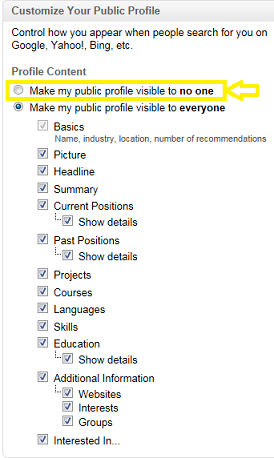
In the next screen you can opt to share only the bits you’re happy about, or hide your profile altogether with this useful menu in the column on the right:

LinkedIn Profile Visibility

Here you can review your public profile and hide anything you feel is not up to scratch. If that leaves you with a minimalistic profile you know which parts you need to tackle at once.

Continue to work on the other parts and share those after extra thought and editing. After all it’s important information – based on this, a recruiter or a potential client may decide whether or not to contact you. They may check for your name elsewhere but let’s assume they’re human and therefore either too lazy or too busy.

Don’t forget to change your settings back when you’re done!

Tips to turn your profile into a career on LinkedIn

Try any or all of these actions. If you’re on LinkedIn but don’t have a clue how you should do any of it, just ask – I’ll write a post or two on individual actions I’ve listed here. My comments section below is open for business 😀

  1. Follow a couple of businesses you wouldn’t mind working for (as an employee or a business owner).
  2. Seek out recruiters who match your standards for social media usage. Some hide their networks from their connections, some don’t. Decide which kind you’re comfortable with.
  3. Connect with fellow students who basically face the same questions and consider teaming up to get the LinkedIn part of your lives up and running together.
  4. Find some active groups that are relevant to your professional interests. This way you keep up to date about your field of expertise, and these groups are shown on your profile (unless you hide them).
  5. Connect with a couple of teachers/professors. Criteria: depth/breadth of expertise, network, they teach your favorite topics, or you just get along with them well.

If you’re thinking of starting on LinkedIn and/or getting serious about your career, you’re welcome to share your thoughts – I promise to reply to any non-spammy comment 🙂

Blogging impressions: two tips for (automatic) sharing

One lesson I learned from all the blogs I read before starting my own blog is this: Mind how you share. In this post I’ll give you two tips plus reasons why you might consider trying them out.

1. Check every sharing button on your blogMind how you share

This may sound silly but have you checked what happens if you click any of the sharing buttons on your blog? Serious bloggers have all manner of cool stuff added to their blog, like floating sharing bars, that make it easier to share their content – if it all works! You should be able to just share. But it doesn’t always work out that way.

However I wrote on this topic quite a while ago. My second tip is about something quite a few people don’t do – but they should!

2. Check your shared messages on social networks

If you’re on Twitter you may have noticed crappy tweets that stop mid-sentence because they were automatically shared to Twitter from another social network, like Facebook.

On the other hand, if you’re on Twitter and you share to Facebook automatically, you may end up with tweetlike stuff on your Facebook page. It’s why I added, tried, and then quickly removed my automatic sharing connection from WordPress to Facebook earlier.

Why share if you make it obvious that you don’t know, or don’t care, what your messages look like?

Using the Publicize option to share your blog posts

In case you’re not using it: on WordPress you have the option to connect several of your social network accounts to your blog. You can view and edit these messages just above the “Publish” button. Every time you publish, your message is shared to every account you’ve hooked up. Unless you uncheck the check boxes first. You can edit the message before you publish your post, but you can only send one message that’s identical for all networks.

A perfect tweet may well be a crappy Facebook update!

If you need your message to go out to several social networks:

  • Skip those #!#! hashtags (for Facebook)
  • Keep it short (for Twitter)
  • Check the result every now and then, say every 5-10 posts (This goes for IFTTT recipes too).

The good part of automatic sharing

I’m mostly so relieved to have pressed the “Publish” button at 10 PM on Friday I then shut down my laptop and call it a weekend. Which means that unless I use this publicize option I end up not sharing the results of my thinking and writing on social media until much later.

Having my automatic messages in place means:

  1. I can concentrate on writing my posts and, after I finish them,
  2. I have more time to read other blogs and to comment on them.
  3. When on social media, I can focus on the social bit 🙂

If you feel it’s too much hassle to get onto social media AND figure all this stuff out AND actually be active out there so you decide to not bother at all, that’s completely fine by me. I understand and appreciate not bumping into your ‘zombie’ Twitter account 😉

That’s it for this year! See you here next year. If you’d like to add your thoughts about sharing please do so in a comment – I promise I’ll respond to your contribution!